> ## Documentation Index
> Fetch the complete documentation index at: https://docs.hackersquad.io/llms.txt
> Use this file to discover all available pages before exploring further.
# Submit a project
> Submit your project details from the Builder Portal, then complete the required video submission in HackerSquad.
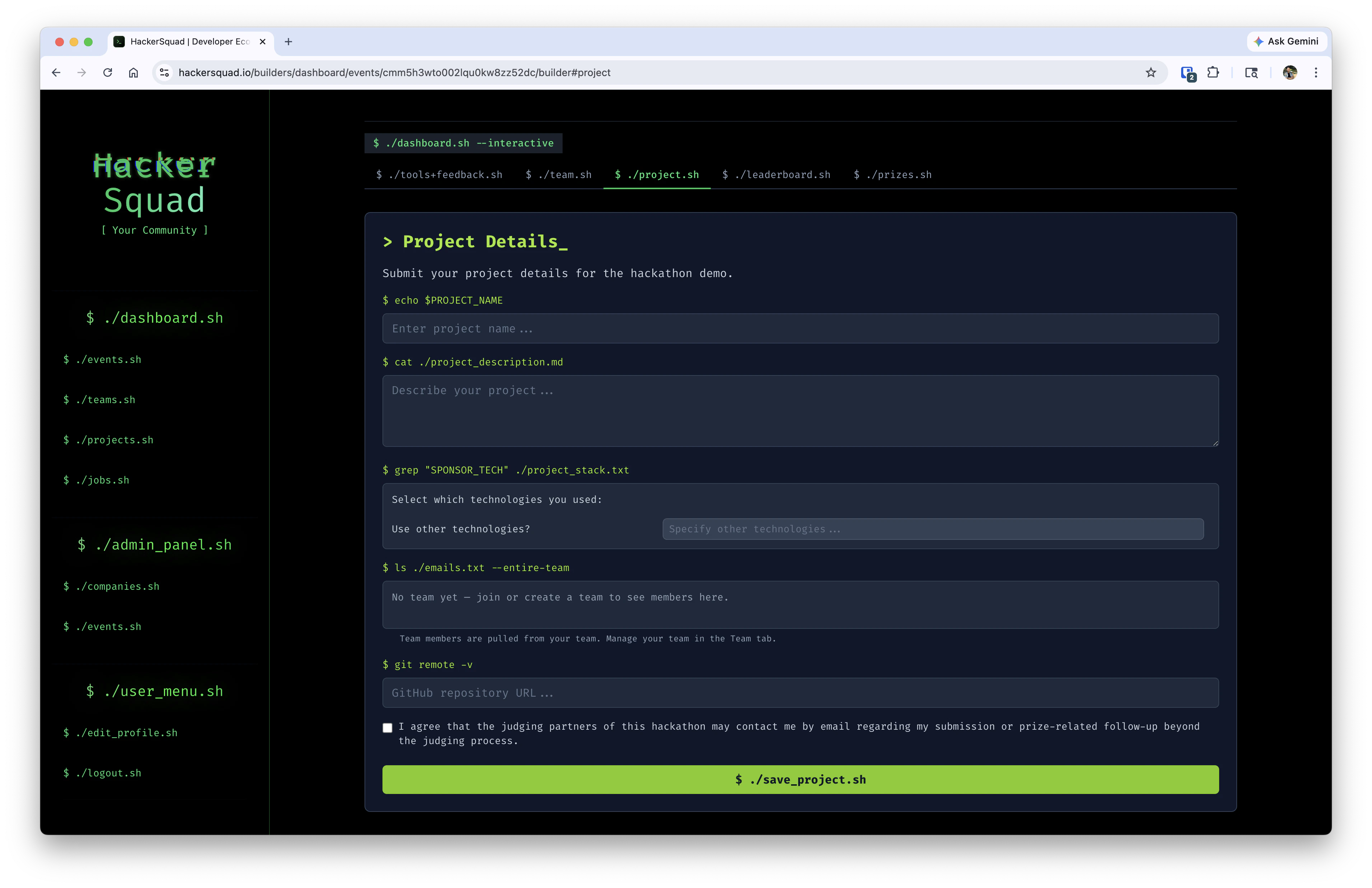
When your team is ready to submit, go to the Builder Portal and open the `project.sh` tab. This is where you enter the core details of your project for the hackathon.
Project submission is the first part of the review process. After you submit these details, you also need to submit your project video through HackerSquad.
## Open the project details form
From the Builder Portal, navigate to the `project.sh` tab and complete the project details form.
 ## Complete the project details
Fill out each part of the form carefully so event managers, judges, and partners can understand what you built.
| Field | What to enter |
| ------------------------------- | --------------------------------------------------------------------------------------------------------------------------------------------------------------------- |
| **Project name** | Enter the name of your project. Choose a clear name that helps reviewers understand what your team built. |
| **Project description** | Describe your project, what problem it solves, and how it works. Use this space to explain the technical story of your submission. |
| **Technologies used** | Select the technologies your team used during the hackathon. This helps organizers and partners understand how their tools were used. |
| **Other technologies** | If you used tools that are not listed, add them here so your project stack is represented more completely. |
| **Team members** | HackerSquad pulls this from your team automatically. If you do not see the right people here, update your team in the Team tab first. |
| **GitHub repository URL** | Add the repository link for your project so reviewers can inspect the code and understand the implementation. |
| **Contact permission checkbox** | Check this if you agree that judging partners for the hackathon may contact you by email about your submission or prize-related follow-up beyond the judging process. |
After you complete the form, click `./save_project.sh` to save your project submission.
Write your description for someone who did not watch you build the project. Clear descriptions make it much easier for organizers and judges to review your work.
## Submit your project video next
Submitting the project details form is not the final step. After this, you must also submit your project video through HackerSquad.
The video submission is required because it helps the teams managing the hackathon review your project successfully. A video gives organizers and judges a reliable way to understand your demo, even if they cannot see the project live in person.
When you begin the video submission flow, go through these three steps to start the recording:
1. Select the screen to share. We recommend sharing your entire screen.
2. Enable camera and mic.
3. Click **Start Recording**.
## Why the video matters
Your project video helps reviewers:
* Understand what your project does
* See the product in action
* Review your submission consistently
* Compare projects more fairly across the event
## Next steps
Return to the Builder Portal and continue the rest of your submission flow.
Review other builder workflows available from the Builder Portal.
## Complete the project details
Fill out each part of the form carefully so event managers, judges, and partners can understand what you built.
| Field | What to enter |
| ------------------------------- | --------------------------------------------------------------------------------------------------------------------------------------------------------------------- |
| **Project name** | Enter the name of your project. Choose a clear name that helps reviewers understand what your team built. |
| **Project description** | Describe your project, what problem it solves, and how it works. Use this space to explain the technical story of your submission. |
| **Technologies used** | Select the technologies your team used during the hackathon. This helps organizers and partners understand how their tools were used. |
| **Other technologies** | If you used tools that are not listed, add them here so your project stack is represented more completely. |
| **Team members** | HackerSquad pulls this from your team automatically. If you do not see the right people here, update your team in the Team tab first. |
| **GitHub repository URL** | Add the repository link for your project so reviewers can inspect the code and understand the implementation. |
| **Contact permission checkbox** | Check this if you agree that judging partners for the hackathon may contact you by email about your submission or prize-related follow-up beyond the judging process. |
After you complete the form, click `./save_project.sh` to save your project submission.
Write your description for someone who did not watch you build the project. Clear descriptions make it much easier for organizers and judges to review your work.
## Submit your project video next
Submitting the project details form is not the final step. After this, you must also submit your project video through HackerSquad.
The video submission is required because it helps the teams managing the hackathon review your project successfully. A video gives organizers and judges a reliable way to understand your demo, even if they cannot see the project live in person.
When you begin the video submission flow, go through these three steps to start the recording:
1. Select the screen to share. We recommend sharing your entire screen.
2. Enable camera and mic.
3. Click **Start Recording**.
## Why the video matters
Your project video helps reviewers:
* Understand what your project does
* See the product in action
* Review your submission consistently
* Compare projects more fairly across the event
## Next steps
Return to the Builder Portal and continue the rest of your submission flow.
Review other builder workflows available from the Builder Portal.